
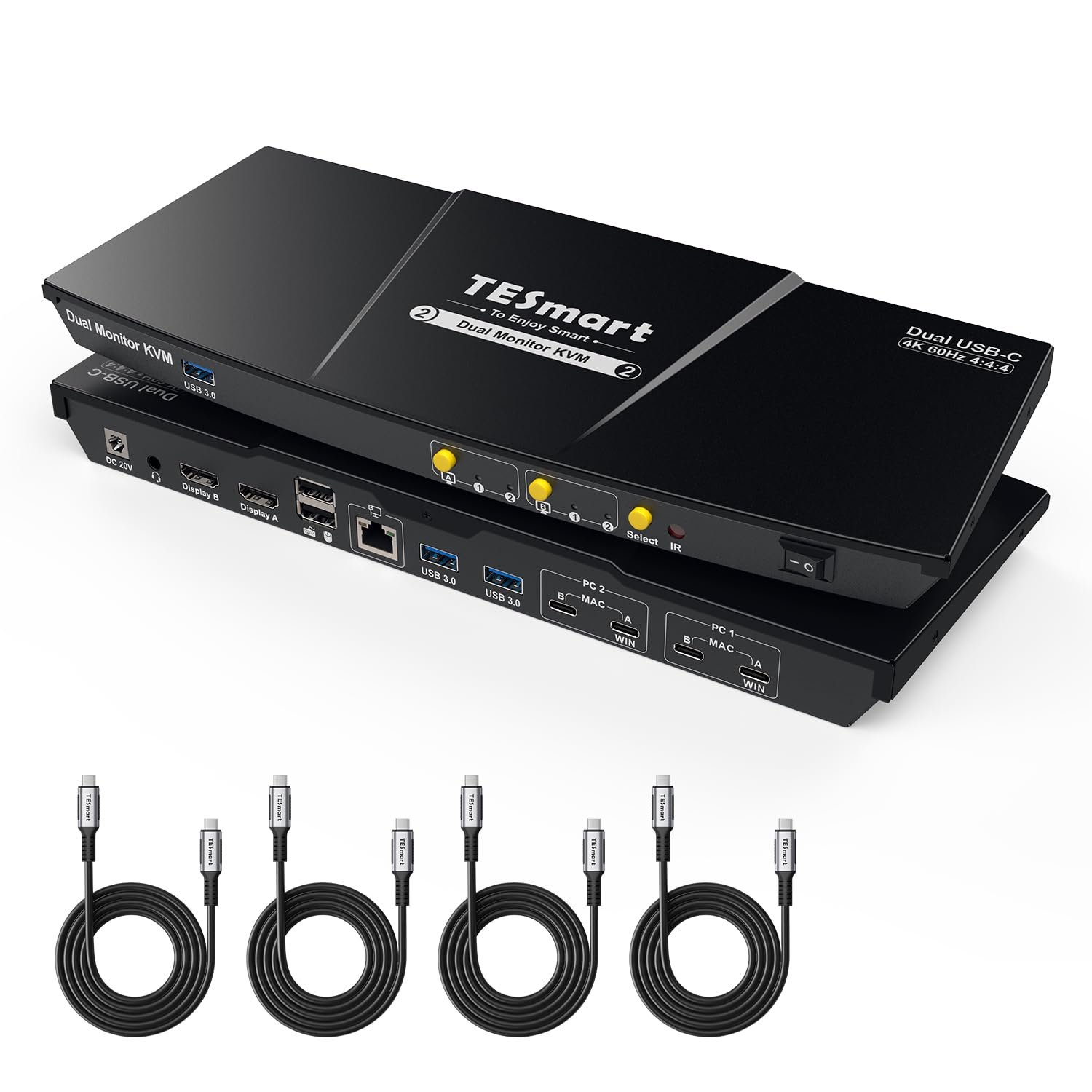
TESmart USB-C KVM Switch 2 Monitors 2 Laptops 4K@60Hz, USB 3.0 KVM Switch Dual Monitor MST, EDID Emulation, 60W PD, 1G Ethernet, 2K@144Hz, 1080P@240Hz, Hotkey Switch, with All Input Cables
$459.99
Related Products








Product description
TESmart USB3.0 Dual Monitor USB-C KVM for 2 Laptops & 2 HDMI Monitors 
The video showcases the product in use.The video guides you through product setup.The video compares multiple products.The video shows the product being unpacked. USB-C KVM Switch 2 Monitors 2 Laptops


1 MST Modes (macOS & Win)
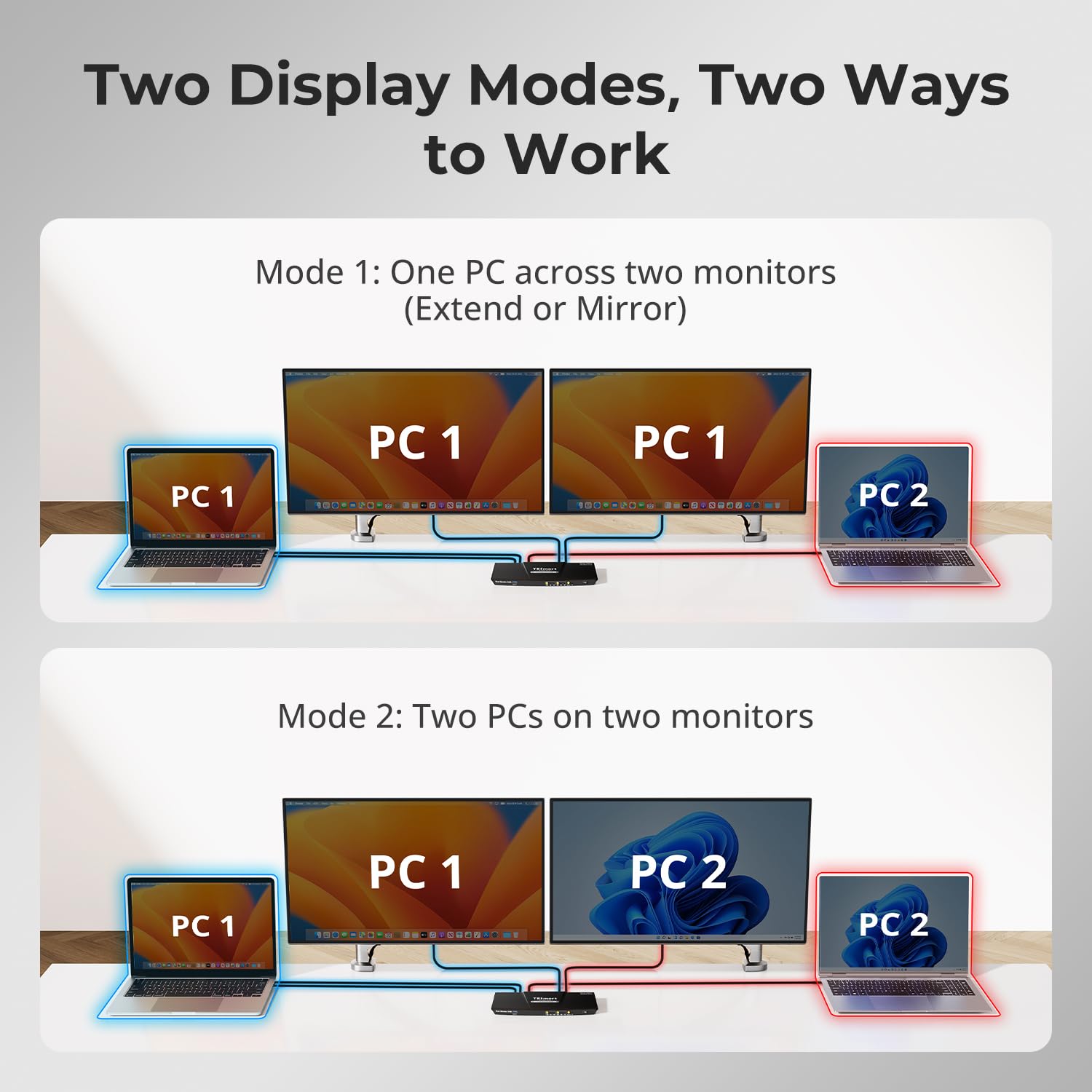
2 2 Display Modes
3 USB & Audio Lock


1 60W & 1000Mbps
2 EDID Emulation
3 Botton/Hotkey/IR Switch


1 2xUSB-C
2 4K@60Hz
3 K&M Compatibility
4 Device Compatibility
Why does my MacBook only show two mirrored displays instead of dual extended displays on this CKS202-P23 KVM?
Due to macOS chip limits, M1/M2 Macs can natively output only one external extended display, while M3 has the same limit in open-lid mode. For M1/M2/M3 users, TESmart HDC203-PM24 is optimal solution, as its PC1 port uses DisplayLink to overcome this.
Will this TESmart KVM affect network performance or send screen/keyboard data externally?
No. The Ethernet port only shares network between connected devices, and the KVM itself never connects online or uploads data. You can also disable network sharing for a selected PC with hotkeys [Right Ctrl] + [Right Ctrl] + [F4].
Can my laptop be powered through this USB-C KVM switch?
Yes. CKS202-P23 provides up to 60W (20V 3A), enough for most business laptops. High-power models needing 90W–120W may charge slowly; in that case, use the original adapter alongside the KVM for full performance.
Is this KVM difficult to set up, and will I lose display during switching?
No, the setup is simple with plug-and-play. Be sure to connect the USB-C cable to a Thunderbolt port or a USB-C port with DP Alt Mode; otherwise, display loss may occur. With proper connection, it works stably.
Why are the hotkeys not working when I try to switch?
Make sure the keyboard is connected to the console USB port(keyboard icon). The default hotkey is [Right Ctrl]; if your keyboard lacks this key, hold the front [Select] button until a long beep to set any key as the new hotkey(see manual).
Optimize Your Workflow with TESmart KVM Solutions
Add to Cart
Add to Cart
Add to Cart
Add to Cart
Add to Cart
Add to Cart
Customer Reviews
3.9 out of 5 stars 58
3.4 out of 5 stars 12
3.9 out of 5 stars 58
3.8 out of 5 stars 43
4.2 out of 5 stars 28
5.0 out of 5 stars 1
Price
$459.99$459.99
$499.99$499.99
$439.99$439.99
$699.99$699.99
$699.00$699.00
$899.99$899.99
Connected Devices
2 Laptops
2 Laptops
1 Desktop& 1 Laptop
1 Desktop& 1 Laptop
1 Desktop& 1 Laptop
2 PC& 2 Laptops
Computer Ports
2×USB-C+USB-C
2×USB-C
1×HDMI+DP, 1×USB-C+USB-C
1×HDMI+DP+DP, 1×USB-C
1×HDMI+DP, 1×USB-C+USB-C
2×DP+DP+HDMI,2×USB-C
Display Setup
Dual Monitor
Single Monitor
Dual Monitor
Triple Monitor
Dual Monitor
Triple Monitor
Video Resolution
4K@60Hz, 2K@144Hz, 1080P@240Hz
8K60Hz,4K144/165Hz,1080P@240Hz
4K@60Hz, 2K@144Hz, 1080P@240Hz
4K@60Hz, 2K@144Hz, 1080P@240Hz
4K@60Hz, 2K@144Hz, 1080P@240Hz
4K@60Hz, 2K@144Hz, 1080P@240Hz
Shared USB Devices
3x USB3.0(1 charging),2×USB1.1
4x USB3.0(2 charging),2×USB1.1
3x USB3.0(2 charging),2×USB1.1
4x USB3.0(2 charging),2×USB1.1
4x USB3.0(2 charging),2×USB1.1
4x USB3.0(2 charging),2×USB1.1
Laptop Charging
60W
60W
60W
60W
60W
60W
Control
Button/IR Remote/Hotkeys
Button/IR/Hotkeys/Mouse Wheel
Button/IR/Hotkeys/Mouse Wheel
Button/IR/Hotkeys/Mouse Wheel
Button/IR/Hotkeys/Mouse Wheel
Button/IR Remote/Hotkeys
Custom Hotkey Function
√(Any Key)
√(Any Key)
√(Any Key)
√(Any Key)
√(Any Key)
×
Gigabit Ethernet
1000Mbps
1000Mbps (on/off)
1000Mbps (on/off)
1000Mbps (on/off)
1000Mbps (on/off)
1000Mbps (on/off)
EDID Emulation
√
√
√
√
√
√
Audio & Mic Support
√
√
√
√
√
√
Included Cables
4× USB-C Cables
2× USB-C Cables
1×USB B-A,1×HDMI,1×DP,2× USB-C
1×USB B-A,1×HDMI,2×DP, 1×USB-C
1×TB4,1×DP,1×USB B-A,1×HDMI
2×USB B-A,2×HDMI,4×DP,2×USB-C
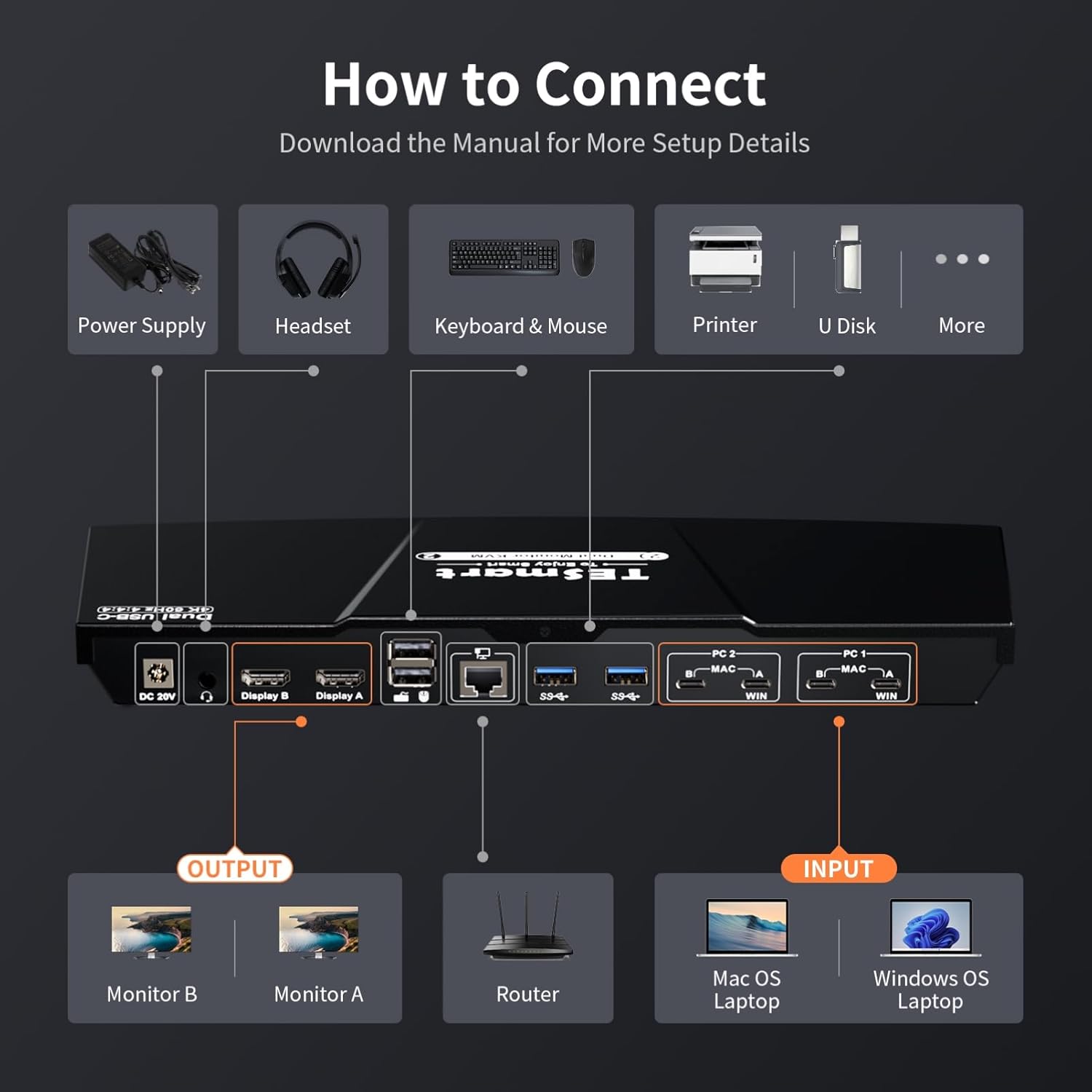
New Dual Display Design:Equipped with 2 sets of Dual USB-C ports which are optimized for 2 laptops. Effortlessly switch between your productivity workstation and gaming laptop with a single key. Compatible with Windows laptops featuring MST and MacBooks, enjoy the “ABC” effect of two extended monitors
Note: Each MacBook requires two USB-C connections to this KVM for dual-display functionality. Also, due to macOS chip limits, M1/M2 Macs can natively output only one external extended display, while M3 has the same limit in open-lid mode. For M1/M2/M3 users, TESmart HDC203-PM24 is optimal solution, as its PC1 port uses DisplayLink to overcome this.
All-in-One USB-C KVM Docking Station — Includes 3× USB 3.2 Gen 1 ports (5Gbps, one with 7.5W power output), 2× USB 1.1 ports (customized for keyboards and mice, compatible with most of setups), 1× gigabit LAN port, 1× 3.5mm headset jack, and 2× HDMI 2.0 outputs for a complete home office setup.
60W Power Delivery for Workstations — This dual-monitor KVM switch keeps both laptops powered while reducing cable clutter, so you can stay connected without extra adapters. ⚠️ Important Notice: If your laptop charging protocol does not support 20V DC voltage, a handshake failure may occur, causing the laptop to receive only 7.5W of power. It is currently found that some models in the Thinkpad series are affected by this issue and are unable to receive the expected 60W power supply.
High-Resolution + High Refresh Rate:HDMI 2.0 compatible, supporting up to 4K@60Hz 4:4:4. Catering to high refresh rate enthusiasts with support for 1080P@240Hz/165Hz/144Hz/120Hz and 2560×1440@144Hz/120Hz, meeting the needs of both designers seeking crisp visuals and gamers desiring swift refresh rates
Advanced Features for a Streamlined Setup:Choose between Shared or Independent PC Views with 2 Modes. Effortlessly switch inputs using hotkeys, the front panel button, or the remote control. Seamless K&M operation after switching. EDID emulation prevents resolution and icon rearrangement. K&M pass-through ensures adaptability with various keyboards, including wired, wireless, mechanical, and gaming keyboards
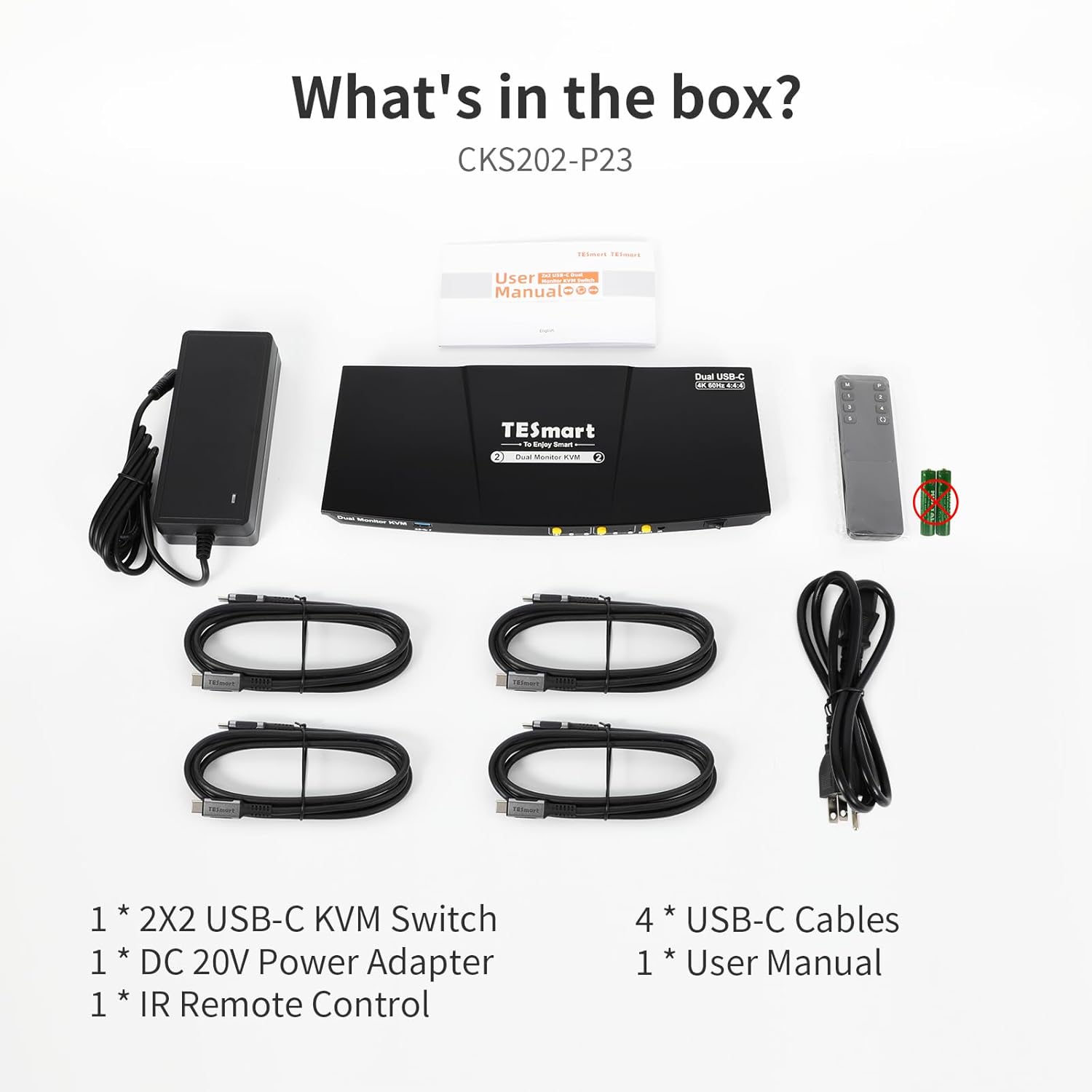
Includes KVM-to-Laptop cables (4 * USB-C Cables) for a complete setup
8 reviews for TESmart USB-C KVM Switch 2 Monitors 2 Laptops 4K@60Hz, USB 3.0 KVM Switch Dual Monitor MST, EDID Emulation, 60W PD, 1G Ethernet, 2K@144Hz, 1080P@240Hz, Hotkey Switch, with All Input Cables
Add a review
$459.99
VirtualWatts –
Amazon Customer –
Mark –
Josh Ray –
sim –
Michael Parker –
Spud Daddy –
Derek Tran –