
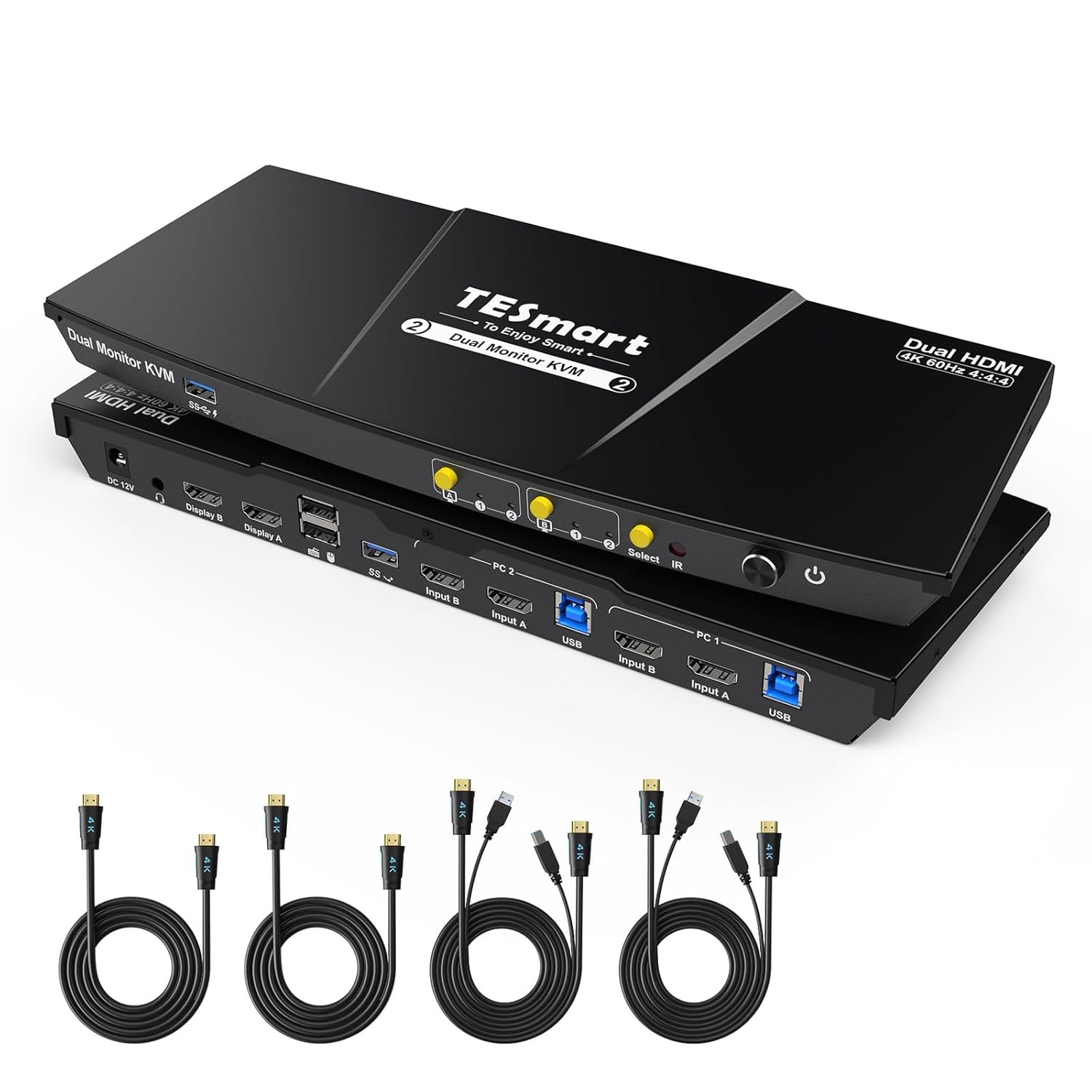
TESmart USB 3.0 HDMI KVM Switch 2 Monitors 2 Computers 4K@60Hz, Dual Monitor KVM Switch HDMI 2 Port Extended Display, Audio&Microphone, EDID Emulators, Hotkey Switch, Button Switch with Input Cables
$259.99
Related Products









Product description
USB 3.0 KVM Switch Dual Monitor 2 Port (INPUT Ports:HDMI + HDMI ) 


1 Busy→Ideal Home Office
2 Home Office & Gaming


1 2 Display Modes
2 EDID Emulation
3 Button/Hotkey/IR Switch
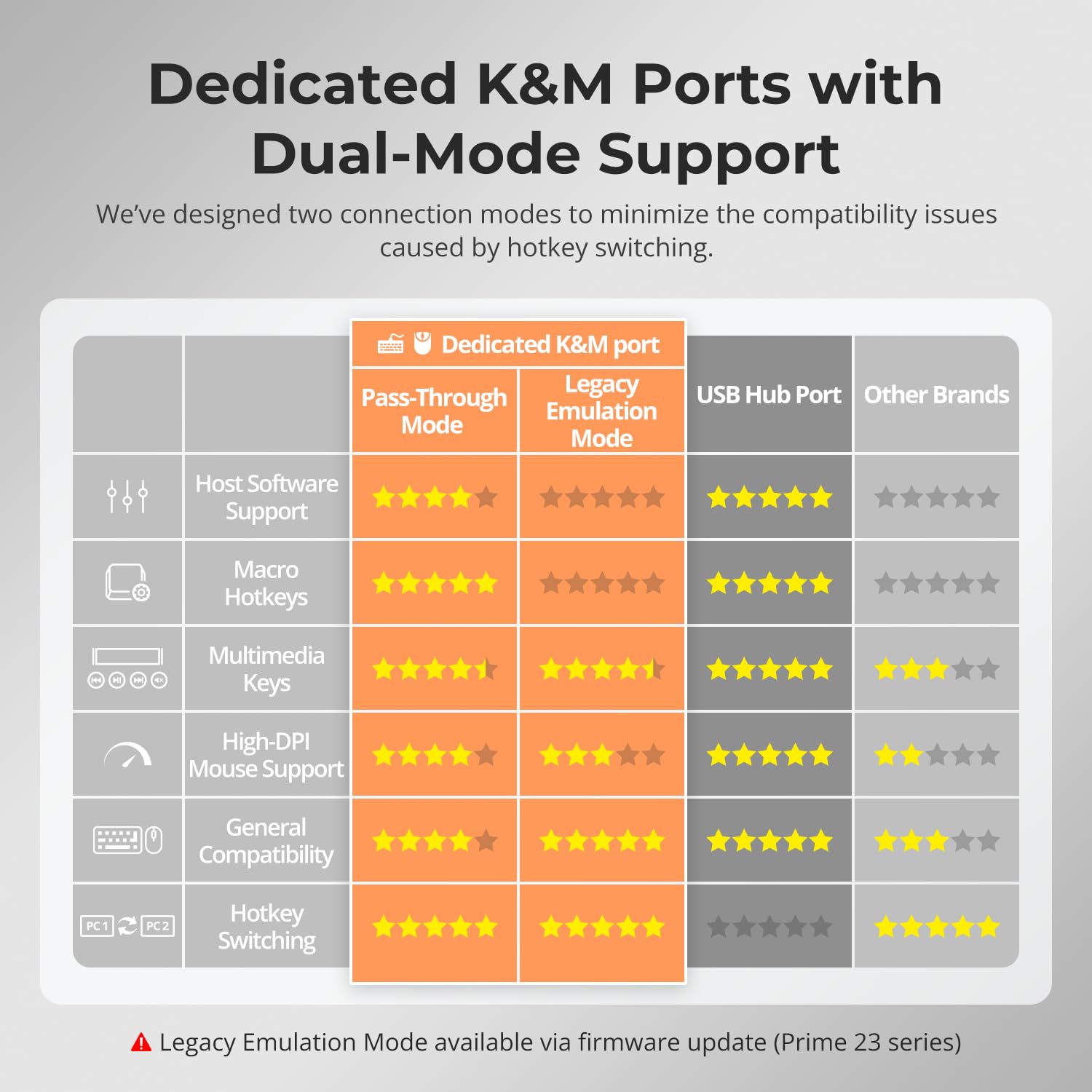
4 K&M Compatibility


1 2 HDMI×HDMI
2 Packing List
3 Multiple Connection Modes
4 PC & Laptop Connections
5 USB & Audio Lock


1 Charge Your Device
2 Sharing Headset
3 No Delay of K&M Switching
4 Switch Focus with Ease
Does this KVM support seamless switching?
Keyboard and mouse switch seamlessly, while video switching completes within 2–3 seconds—typically under 1 second in lab tests. Actual time may vary by cable quality, port oxidation, or transmission distance.
Can it be used for cross-platform setups like Windows and Mac?
Yes. It supports keyboard, mouse, and display switching across different systems, making it ideal for managing Windows, macOS, and Linux devices together.
Can this KVM work with a PC that has DisplayPort output?
If your desktop only has HDMI and DisplayPort outputs, we recommend choosing the TESmart HDK202-P23. It features dual HDMI and DisplayPort input ports to ensure stable performance and native signal support.
Does this KVM switch support firmware upgrades?
Yes. TESmart offers official firmware updates to fix issues and improve compatibility; updates carry risk—don’t update a working unit. If required, proceed under TESmart technical support guidance for correct firmware and instructions.
Can I use the KVM right out of the box, and are cables included?
Yes, it is plug-and-play with no drivers required. We provides four HDMI 2.0 cables and two USB A-B cables. Monitor HDMI cables are not included to reduce waste, as monitors typically come with cables.
Streamline Your Workflow — Find the TESmart KVM Solution for Your Setup
Add to Cart
Add to Cart
Add to Cart
Add to Cart
Customer Reviews
3.2 out of 5 stars 101
3.7 out of 5 stars 23
3.7 out of 5 stars 585
3.4 out of 5 stars 66
4.1 out of 5 stars 6
Price
$259.99$259.99
$389.99$389.99
$269.99$269.99
—
$768.99$768.99
Connected Devices
2 Computers
2 Computers
2 Computers
4 Computers
1 Desktop& 1 Laptop
Computer Ports
2× HDMI+HDMI
2× HDMI+HDMI
2× HDMI+DP
4× HDMI+HDMI+HDMI
1×HDMI+DP+DP, 1×USB-C
Display Setup
Dual Monitor
Dual Monitor
Dual Monitor
Triple Monitor
Triple Monitor
Video Resolution
4K@60Hz, 2K@144Hz, 1080P@240Hz
8K60Hz,4K144/165Hz,1080P@240Hz
4K@60Hz, 2K@144Hz, 1080P@240Hz
4K@60Hz, 2K@144Hz, 1080P@240Hz
4K@60Hz, 2K@144Hz, 1080P@240Hz
Shared USB Devices
2x USB3.0(2 charging),2×USB1.1
2x USB3.0(2 charging),2×USB1.1
2x USB3.0(2 charging),2×USB1.1
3x USB3.0(2 charging),2×USB1.1
4x USB3.0(2 charging),2×USB1.1
Laptop Charging
×
×
×
×
100W(for one laptop)
Control
Button/IR Remote/Hotkeys
Button/IR/Hotkeys/Mouse Wheel
Button/IR Remote/Hotkeys
Button/IR Remote/Hotkeys
Button/IR/Hotkeys/Mouse Wheel
Custom Hotkey Function
×
√(Any Key)
×
×
√(Any Key)
Gigabit Ethernet
×
1000Mbps (on/off)
×
100Mbps
1000Mbps (on/off)
EDID Emulation
√
√
√
√
√
Thermal Management-Fan Control
No fan
4-mode (Off/Auto/Low/High)
No fan
No fan
No fan
Included Cables
2×USB B-A, 4×HDMI cables
2×USB B-A, 4×HDMI cables
2×USB B-A,2×HDMI,2×DP
4×USB B-A, 12×HDMI cables
1×USB B-A,1×HDMI,2×DP, 1×USB-C
Support 2 * (HDMI+HDMI+USB-B) In and 2 * HDMI Out: Ideal for access 2 desktops or laptops with 2 monitors and 1 set of keyboard mouse. You can easily have a dual monitor setup per system or switch it to a single monitor system showing both systems (one on each monitor) and then easily toggle the keyboard/mouse between the 2 systems. You can also change Hot Key combinations, the default is [Right-Ctrl] key, and the alternative are the [Scroll Lock] and [Left-Ctrl] key
“Blast, Fast, Past” with 2 USB 3.0: The integrated USB 3.0 ports allow you to share USB peripherals like printer, scanner, webcam and hard disk between 2 computers with data transfer rate up to 5Gbp/s (10 times faster than USB 2.0); the USB 3.0 ports on the front panel can charge your phone.Separate toggle buttons on the panel support switching images on each display separately (i.e. display mode 2)
Ultra HD 4K@60Hz and EDID Emulators: The Resolution is up to 3840×2160 (4K) @60hz, 3440×1440@100hz, and downward compatible, Support 3D, HDR10, HDCP2.2, and Dolby Vision delivering more exquisite and authentic video on your screen. With EDID emulators in each input port, your computers always receive the correct display information and preventing displays setting change while switching inputs in display mode 1. Free you from the hassle of constantly adjusting display settings
Integrated Microphone and L/R Audio Output: You can listen to audio from one computer while working on the other or scan a document and save in another computer. Only need to press the front panel keys to operate audio, your headphones will stay ‘active’ during the switch and no longer have to stop and restart meetings
Multi-System Compatibility: TESmart KVM switch 2 computers 2 monitors supports various operating systems including Unix, Windows, Debian, Ubuntu, Fedora, Mac OS X, Raspbian, Ubuntu for Raspberry Pi and other Linux basic systems, making it a versatile selector for multiple devices to be used flexibly with different OS without the need for additional software or drivers. NOTE: Please make sure your laptop is capable of dual monitors before purchasing
Switching with Efficiency and Ease: HDMI 2 monitor KVM provides 3 switching options to suit your needs. Whether you prefer using the IR remote(AAA batteries not included), button, hotkeys, you can easily switch between HDMI sources and manage your devices with ease. Get rid of the hassle of constantly swapping cables between PC, desktop, laptop, monitor, gaming console and streaming device. Experience the convenience and efficiency of multi-device management
High Compatibility with Your Keyboards and Mice: 2 In 2 Out KVM Switches suitable for most keyboards and mice on the market because of the newest upgraded pass-through mode. Support wired, wireless, mechanical, multimedia, and gaming K&M (Not support wireless bluetooth K&M)
Keyboard and Mouse Seamless Switching: No delay, zero latency keyboard and mouse switching makes your use smooth and enhance your work efficiency or gaming experience. No more tangled wires or juggling multiple keyboards and mice.Note:This only be achieved when the keyboard and mouse are plugged into the dedicated port for K&M
Convenient Hot Plug: Easy to set up. Plug and play, no software required. Easily add or remove devices without needing to power off the KVM switch or other connected devices, saving your time and hassle-free. Ideal for multi-tasking professionals and gamers who need to access multiple devices quickly and efficiently
Ultimate Service: This KVM Switch kit comes with 1* 2X2 HDMI KVM Switch, 2* 5ft (HDMI+USB-B) cables, 2* 5ft HDMI cables, 1* IR remote control, 1* DC 12V power adapter, 1* User manual. Plus, enjoy 1-year warranty
3 reviews for TESmart USB 3.0 HDMI KVM Switch 2 Monitors 2 Computers 4K@60Hz, Dual Monitor KVM Switch HDMI 2 Port Extended Display, Audio&Microphone, EDID Emulators, Hotkey Switch, Button Switch with Input Cables
Add a review
$259.99
jonathan –
The Best Gift for My Wife
I mentioned in my other review that my wife used to complain about my cluttered work desktop until I used TESmart’s 2 Monitors 4 Computers kvm switch and now I bought her another dual computer model kvm, my wife is a freelancer. She only has a desktop computer and a laptop. She often edits pictures and videos, doesn’t have 4 PCs with different systems like me, but you can’t imagine that how she love this KVM switch.First of all, it was really easy to install,their user manual is very detailed,my wife was able to do it right from the instructions and didn’t even need my help(except a docking station).Her highest appreciation for this KVM is that when she is editing pictures, the left screen displays the material website, and she can directly drag the picture materials to the right screen for editing. when she wants to entertain, she can easily switch to another A computer has greatly improved her work experience.The USB 3.0 compatibility sets this KVM switch apart. In comparison to other USB 2.0 KVMs, the transfer speeds are as different as night and day – imagine the contrast between a 19th-century steam train and a sleek modern airplane.The support for resolutions up to 3840×2160@60Hz with 4:4:4 color accuracy is essential for anyone like my wife who works with high-definition content, ensuring crystal-clear visuals.I occasionally play Steam’s Forza Horizon 4 with my wife’s desktop. I adjust the resolution to 2K so that I can get a refresh rate of 144Hz.The KVM switch provides multiple control options, including IR signals, front panel buttons, and keyboard hot keys. My wife likes the keyboard hot key switch best, while I prefer the physical buttons on the front panel.The ability to charge mobile phones and tablets through the front panel USB-A port is an excellent addition, saving us from fumbling for chargers and sockets. Another very important feature is the EDID emulator, which saves us from repeatedly resizing the working window.But my wife also has some complaints, to set up a dual-screen display, you’ll need to connect two video outputs from your computer to KVM switch. Her laptop doesn’t have two HDMI ports, so I purchased a docking station, which was extra cost.Compared with other brands of kvm switchers, TESmart seems to be a bit more expensive, but compared to its reliability, I think this is the price I should pay.TESmart kvm switch has transformed my and my wife’s studio,as a system architect, I appreciate the seamless integration it offers, while as a husband, I’m delighted to see my wife enjoying her work even more with this outstanding tool. For anyone seeking to optimize their home office and multimedia tasks, this KVM switch is a wise investment that will undoubtedly enhance your daily life.
EL W –
Keyboard and Mouse inputs do not work
The TESmart KVM switch is able to switch Video, but not Keyboard and Mouse. I’m using a basic wired HP keyboard and mouse. The rear panel dedicated keyboard and mouse inputs don’t work at all and I tried various keyboards and mice I have on hand, including a wireless Microsoft keyboard. None of them work using those ports for either PC1 or PC2. Per their support page, I tried putting a USB hub into the front panel port and attaching the keyboard/mouse to the hub. This works, but only for PC 2, PC1 doesn’t see a keyboard or mouse when I switch to PC1, even though the video switches over just fine. Even worse, when switched to PC1, the keyboard/mouse is still active on PC2. I’ve followed the troubleshooting guide, swapping all cables for PC1 to the PC2 port and vis versa. The problem of not seeing keyboard/mouse is always associated with the PC attached to the PC1 ports.On the last page in the user manual, I see they’ve only tested this with 15 keyboards/mice, majority of them are Logitech. This list should be on the Amazon purchase page! Could have avoided a lot of hassle buying, connecting and returning a KVM device that probably only works with 15 keyboards. Returning this today.
Double A –
Think twice if considering for MAC (Thunderbolt / USB-C)
TLDR: This KVM is about as effective as the laughable AI summary from Amazon. In what world does more than 50% of ratings being at 1 or 2 stars amount to a summary “Customers find the KVM to be a fantastic product” ???? NOPE. Objectively, customers do NOT. Your AI helper is tuned for sales, not for helping customers. Good grief.Does not play well with Thunderbolt to HDMI cable (on MacOS). Works fine with my Windows PC though.Not super excited about the performance of this KVM. I used to buy a lot of KVMs for a tech studio and know from experience that finding one that plays well with Mac & Windows and dual monitor setups is non-trivial.That being said… I’ve been living with this for a while now and it has not performed well, specifically – I experience regular flicker (meaning, monitor off / on — not just subtle screen glitches) on one of the monitors, when the KVM is set to my Mac. More on that below.THE BAD:• The KVM is not working with a standard cable that has been tested – and meets the stated spec (4K @ 60Hz)• That cable situation is pretty common if you are using a Mac built in the last 3-4 years (maybe even more common than that)• Update – using 2 identical monitors now, and still not loving the perf / flakiness of this switcher. Close to throwing it in the bin and going to back to manually switching monitors via the built-in input menu (which is a PITA, but more consistent than this KVM)THE GOOD:• Build Quality – Compatibility problem excepted, this is a really slim, well-built, solid piece of kit. Clear lighting indicators, Operation – it does work fine when set to my Windows PC. I see no issues when on that box• Included – its nice that the appropriate cables are included. They are not the only KVM that does this, but – it is a welcome “feature.” Definitely confirm whether all cables are included if you are shopping & comparing units.• Physical Buttons / Independent Switching – I like the ability to switch only one monitor at a time. I don’t use the K&M portion of my KVMs, so – being able to activate one monitor on Windows and quickly do something there, while the Mac is running on another is a nice feature. They also include a single button that just switches both monitors at the same time.• Buttons are not junky “touchpad” material. They are physical, rubber buttons with a clear LED indicator for active monitor(s).• Slim profile. Unit height is really trim compared to some other modelsA little more background:- Just as an FYI. I did a lot of testing & troubleshooting in order to confirm & isolate the problem. The cables (I tested multiple cables) are fine in isolation. The Mac works in dual display mode flawlessly prior to inserting the KVM into signal chain.- I don’t even ask this KVM to handle Keyboard & Mouse. Just – switch video.- I confirmed (as I said above) that the cables being used are proper spec. They are 4K. They are 60 Hz. They are correct directionally in terms of the conversion > Thunderbolt to HDMI- Made sure both monitors are set to the same display settings…- None of it matters. It’s a bummer.