
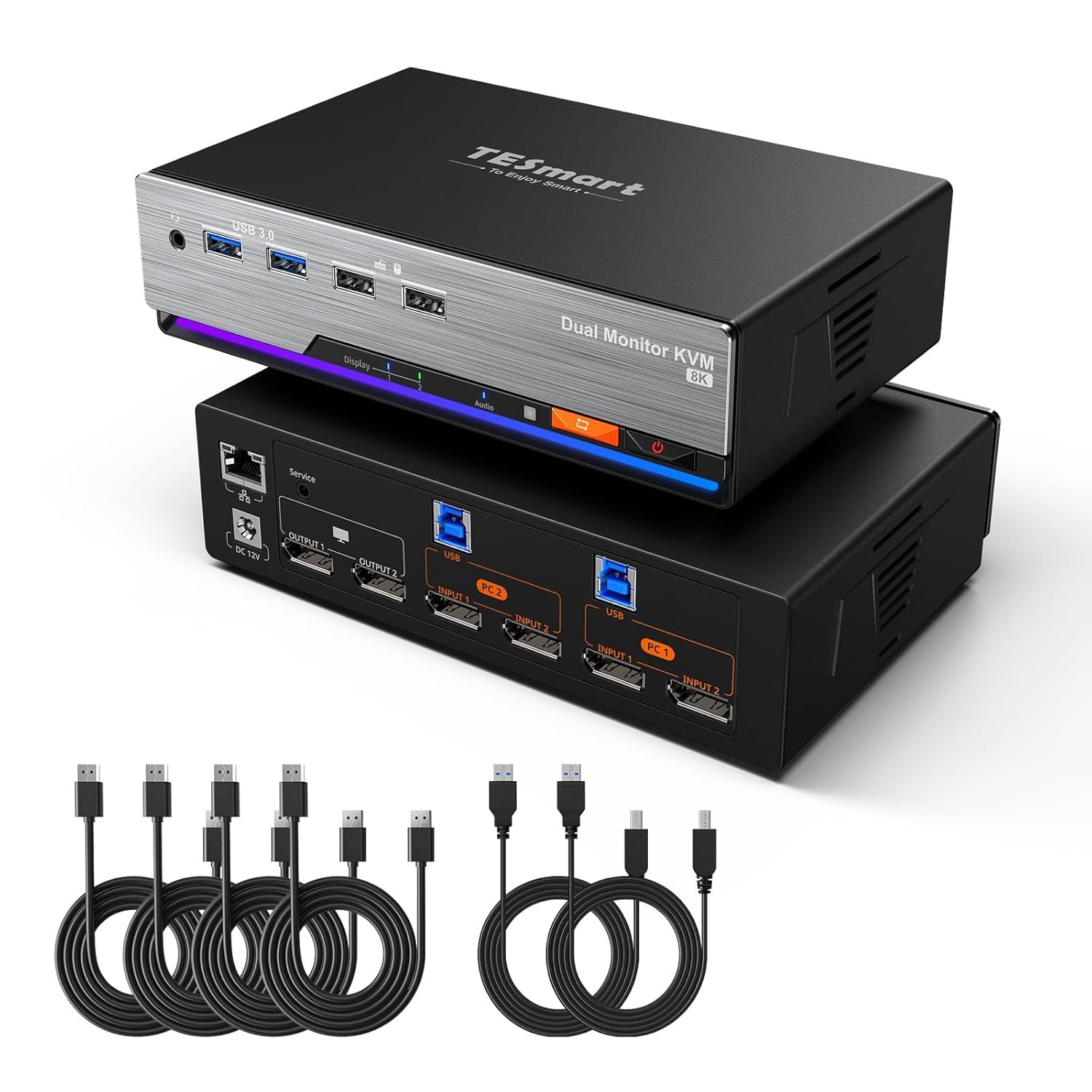
TESmart 8K@60Hz DP KVM Switch 2 Monitors 2 Computers EDID, DP 1.4 KVM Switch Dual Monitor 4K@144Hz for Gaming Dock, Support USB3.0, Gigabit Network, Hotkey Switch, Audio & Mic with All Input Cables
$369.99
Related Products





Product description

The video showcases the product in use.The video guides you through product setup.The video compares multiple products.The video shows the product being unpacked. TESmart DP1.4 KVM Switch 2 Monitors 2 Computers Merchant Video


1 EDID Emulation
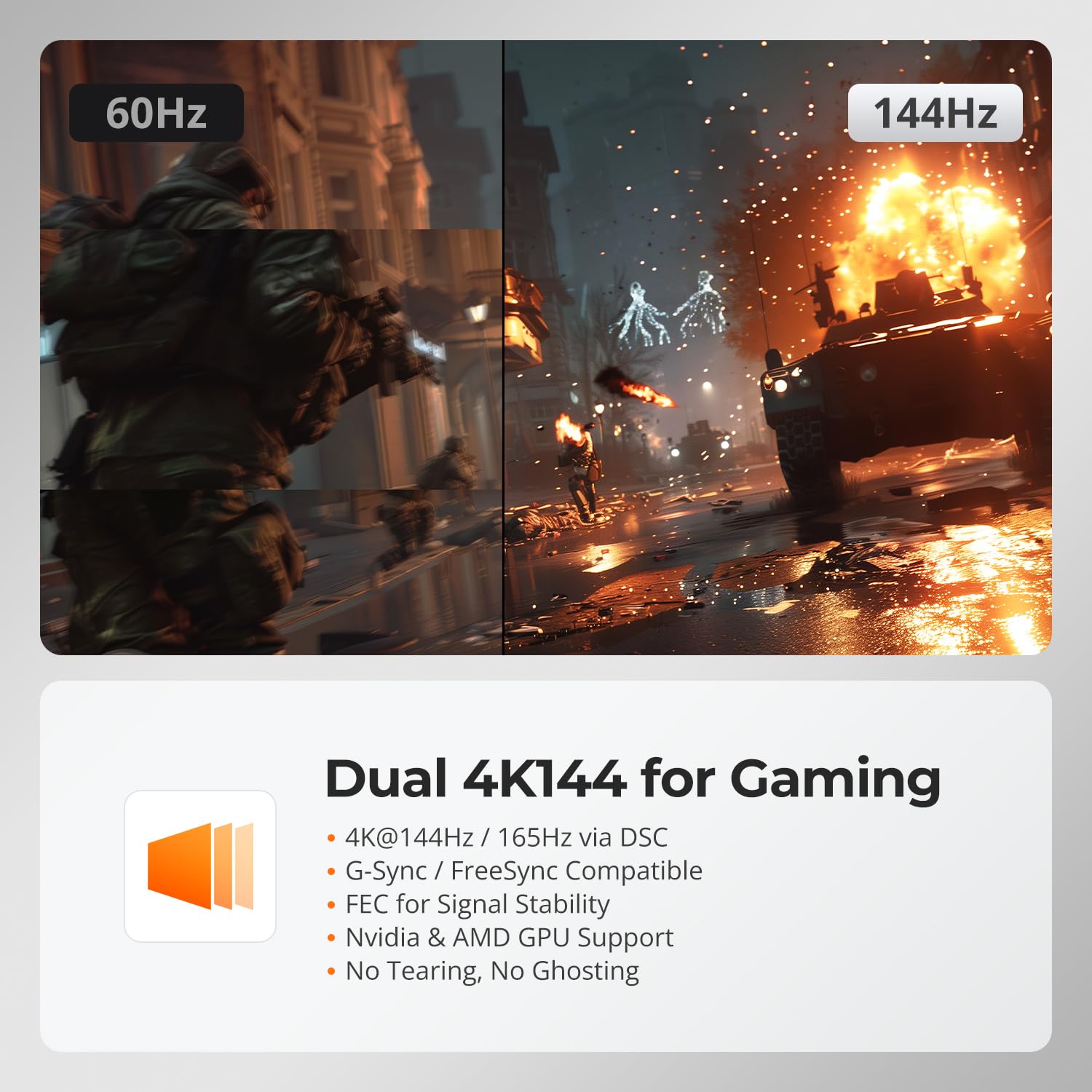
2 4K144 Ultra Refresh
3 8K Visuals


1 2×DP+DP
2 60W & 1000Mbps
3 2 Display Modes
4 USB & Audio Lock


1 Button/Hotkey/ IR Switch
2 K&M Compatibility
3 Connection diagram
4 Packing List
What makes the TESmart DKS202-M24 special?
It is a DisplayPort 1.4 KVM with EDID emulation, streamlining your workflow and making it easier to manage dual desktops with dual DP monitors, USB devices and one keyboard/mouse. Supports 4K144Hz, Gigabit Ethernet, hotkey/button/IR switching
Will switching between computers cause window resets or resolution issues like on other KVMs?
No. DKS202-M24 features TESmart’s exclusive DP EDID emulation technology, a capability rarely found in DP KVMs. This ensures resolutions and window layouts stay stable, preventing screen resets or window repositioning on KVMs without EDID.
What ultrawide monitors are compatible with this 8K DP KVM DKS202-M24?
Tested with C49RG90SSC 144Hz & LS49CG954ECXXF 240Hz, with support for 5120×1440@120Hz. Note that PC port must support DP1.4/HDMI 2.1 or above. Compatibility may still vary by model. For models not listed above, refer to the FAQ documents.
My monitor only has HDMI ports. Can I use an adapter with this KVM?
For the most stable performance, we suggest using native DP connections with this KVM; otherwise, display issues may occur. If your monitors are HDMI-only, consider TESmart HKS202-M24 or HDK202-M24 HDMI KVMs for better compatibility.
My USB devices (keyboard/mouse) don’t work with the KVM. What should I do?
First, check USB connections are firm inserted. Verify device compatibility, try a different cable or port, and confirm detection in system settings. If issues continue, refer to the FAQ documents for more details.
Streamline Your Workflow — Find the TESmart KVM Solution for Your Setup
Add to Cart
Add to Cart
Add to Cart
Add to Cart
Add to Cart
Customer Reviews
3.8 out of 5 stars 81
4.1 out of 5 stars 18
3.8 out of 5 stars 43
3.2 out of 5 stars 23
3.9 out of 5 stars 58
Price
$369.99$369.99
$469.99$469.99
$499.99$499.99
$459.99$459.99
$439.99$439.99
Connected Devices
2 Desktops(NOT for Laptop)
2 Desktops(NOT for Laptop)
2 Computers
4 Computers
1 Desktop& 1 Laptop
Computer Ports
2× DP+DP
2× DP+DP+DP
2× HDMI+DP
4× DP+DP
1×HDMI+DP, 1×USB-C+USB-C
Display Setup
Dual Monitor
Triple Monitor
Dual Monitor
Dual Monitor
Dual Monitor
Video Resolution
8K60Hz,4K144/165Hz,1080P@240Hz
8K60Hz,4K144/165Hz,1080P@240Hz
8K60Hz,4K144/165Hz,1080P@240Hz
4K@60Hz, 2K@144Hz, 1080P@240Hz
4K@60Hz, 2K@144Hz, 1080P@240Hz
Shared USB Devices
2x USB 3.0,2×USB1.1
2x USB 3.0,2×USB1.1
2x USB3.0(2 charging),2×USB1.1
4x USB3.0(2 charging),2×USB1.1
3x USB3.0(2 charging),2×USB1.1
Control
Button/IR/Hotkeys/Mouse Wheel
Button/IR/Hotkeys/Mouse Wheel
Button/IR/Hotkeys/Mouse Wheel
Button/IR/Hotkeys
Button/IR/Hotkeys/Mouse Wheel
Custom Hotkey Function
√(Any Key)
√(Any Key)
√(Any Key)
×
×
Gigabit Ethernet
1000Mbps (on/off)
1000Mbps (on/off)
1000Mbps (on/off)
×
1000Mbps (on/off)
EDID Emulation
√ (on/off)
√ (on/off)
√
√
√
Audio & Mic Support
√
√
√
√
√
Included Cables
2×USB B-A, 4×DP
2×USB B-A, 6×DP
2×USB B-A,2×HDMI,2×DP
4×USB B-A, 8×DP
1×USB B-A,1×HDMI,1×DP,2× USB-C
Purpose-built for two DP 1.4 desktops and two DP 1.4 monitors, delivering a stable dual-monitor KVM solution. Designed without HDMI and USB-C inputs. For desktop+laptop setups, a direct USB-C to DP connection is recommended to minimize dock MST processing and power-related signal instability, or please explore TESmart USB-C+DP models (HDC202-P23, HDC203-PM24, HDC203-P24).
Built for Broad Compatibility: This DisplayPort 1.4 KVM switch has undergone multiple brand-level tests during development, and our team continues to improve compatibility with third-party monitors, keyboards, and mice. If you experience issues with different device models, see the Troubleshooting Guide (PDF) under “Safety Documents” on this product page for more information.
Experience dual 8K@60 vision with DP1.4, enhanced by TESmart’s pioneering EDID emulation technology. Enhanced with four technologies: G-Sync, FreeSync, FEC, and DSC
Resolutions up to 8K (4320p)@60Hz: Resolutions up to 8K@60Hz are supported. It is backward compatible with 4K (2160p)@60Hz/120Hz/144Hz. DSC technology allows the transmission of 7680×4320@60Hz 4:4:4 and 3840×2160@144Hz resolutions
EDID Emulators: With EDID emulators in each input port, your computers always receive the correct display information. Free you from the hassle of constantly adjusting display settings
Ideal KVM for Gaming: Supports Dynamic HDR, including HDMI Dynamic HDR metadata, HDR10+, and Dolby Vision, providing higher dynamic range and color accuracy for more realistic display effects. It also supports Variable Refresh Rate (VRR), Fast Vactive (FVA), and Auto Low Latency Mode (ALLM), reducing screen tearing, stuttering, and input lag for a smoother experience
Switching Made Easy: Our KVM offers 4 convenient switching options to suit your needs: keyboard hotkeys (customizable), front panel button, mouse wheel, and IR remote (AAA batteries not included). Effortlessly switch between sources and manage your devices with ease
Integrated Microphone and L/R audio Output: You can listen to audio from one computer while working on the other or scan a document and save in another computer. Only need to press the front panel keys to operate audio, your headphones will stay ‘active’ during the switch and no longer have to stop or restart meetings
6 reviews for TESmart 8K@60Hz DP KVM Switch 2 Monitors 2 Computers EDID, DP 1.4 KVM Switch Dual Monitor 4K@144Hz for Gaming Dock, Support USB3.0, Gigabit Network, Hotkey Switch, Audio & Mic with All Input Cables
Add a review
$369.99
NotLarryEllison –
Exceptional EDID Stability for High Vertical Resolution Dual Monitor Setup, but USB Hubs are Limited
This KVM (Model DKS202-M24-USBK-V2) excels in handling very high-resolution, multi-monitor setups where display stability is critical. It successfully manages my demanding LG DualUp configuration, which uses high vertical resolution displays. After switching from a premium, high-end KVM that failed this test, this TESmart unit solved 90% of my window-resizing issues. However, be aware of compatibility limitations when using USB hubs on the dedicated HID ports.MY SETUP is two LG DualUp monitors (2880×2560 each, 10-bit color, 60Hz). They run at 10-bit colour and are limited to 60 Hz refresh, meaning each monitor requires just under 15 Gbps bandwidth, or a total of ~29 Gbps. This is slightly under 4k for each monitor (full 4k would be a total of ~32 Gbps at that same bit depth and refresh rate). My work computer is a Dell Laptop connected via a Dell WD25TB4 Thunderbolt Dock, meaning the KVM is switching the dock’s output. My second computer is a Desktop PC with a Radeon 6600. Both are connected via Dual DisplayPort 1.4.DISPLAY PERFORMANCE is EXCELLENT. Windows remain in their correct positions and sizes on both monitors across switching cycles, solving the persistent repositioning issues I had with a previous, more expensive KVM. It flawlessly maintains the required 2880×2560 @ 60Hz 10-bit color on both monitors with zero artifacts. I have had two exceptions, though – for ex., Bambu Studio seems to consistently resizes itself after a switch. But this does seem to be application-specific.USB HANDLING is good, but seems to have limitations. There are four USB ports on the front of the KVM – two specifically for HID (keyboard, mouse) and two “regular” USB 3 ports. The two HID ports provide emulation to prevent the operating system from seeing a full device disconnect/reconnect on switch. Devices plugged here are stable and work instantly. However, the standard USB 3.0 ports cause devices to fully disconnect and reconnect on every switch, which is slower. I have four HID devices but only two HID ports. Attempting to run a USB hub (I tried several!!) through one of the dedicated HID ports caused significant problems, rendering any mouse or keyboard connected this way unusable. It appears the specialized emulation logic for these ports may not be fully compatible with external hubs, forcing me to use the slower (due to the extra resetting) standard USB 3.0 port for my third input device. However, for all i know, this could even come down to limitations of the USB spec itself and may not even be a limitation of TESmart’s design.CONCLUSION & RECOMMENDATION – this device avoids window repositioning issues on a complex setup like mine, including a Thunderbolt dock. Be aware of the USB HID port limitation: If you require more than two dedicated, non-resetting input devices, my experience is that you’ll need to pick the two most critical input devices, then put everything else on the standard ports that will reset every time you switch.
Bladeturbo –
exactly what i needed, so worth the money
this product was exactly what i needed to use 2 pcs and 2 monitors. it changed between the pcs effortlessly and fast and i can even use 1 set of speakers. its g-sync and freesync compatible. the only thing i would like to mention is for the money I spent on it, they could at least included 2 AAA batteries.
WanYu –
KVM ok for
Monitors switch well, keyboard switches well, but mice do not switch have to have a separate mouse for each computer other than that very good option for the price
Andrew Merritt –
So far so good
It is working very well so far.I have 2 1440p monitors, 1 ultra wide 34″ and 1 24″. This is powering both at 100hz with no problems.I have this connected to a desktop PC, and a M3 Macbook Pro. It switches fairly quickly between the two and the USB switches immediately.I have 2 complaints.1) I have this under my desk and it’s a bit difficult to get the remote in position to switch. I wish it had a button on an extension that I could mount close to me so I can just press it instead.2) The USB slots reserved for mouse/keyboard seem to disconnect frequently. I have to unplug and replug the dongles very often to restore the connection. Instead, I’m now using a USB hub connected to one of the other USB ports. (I have not tried updating firmware which may fix this issue)Overall this is a great product.
Adam –
Overpriced given the flaws I’ve encountered
Straight forward to setup and use. Well featured. Overpriced given the flaws I’ve encountered.I purchased to share desk space between my gaming computer and my work laptop. Few KVMs claim proper EDID support with performance to match gaming systems. The biggest issues I’ve run into:- When switching from a system that doesn’t support G-Sync to a system that does support G-Sync and has it enabled, one of my monitors repeatedly goes black when the screen is updated. For reference I’m running dual 1440p monitors at 165Hz. Well within the limits of the KVM and display port capabilities.- If a monitor for the non-active system goes to sleep, it seems EDID might disengage as my windows need to be reorganized.The worst of the issues I’ve encountered are observed on Windows 10. Windows 11 seems to behave better, though the G-Sync issue persists on both. It is possible there is some driver compatibility issue.I’ve been trying to work with TESmart support, but it seems to be an endless loop of testing things for them. I’ll probably return the KVM and try something else.Edit: 6 months laterThings haven’t improved. TESmart support jerked me around until I was passed the return date for Amazon. They’ve also claimed that everything I’m seeing is expected. Notably, this model doesn’t support DisplayPort HPD which means the computer that is not active is guaranteed to timeout the DP connection and consider the monitors disconnected. Unfortunately, I’m stuck with the device and now USB is completely unstable. Quite literally, just wiggling the KVM a little causes a full USB reset between both connected computers. I fully regret this purchase.
Mykl –
Does not handle USB peripherals well.
The core functionality works well enough but there are problems with the USB peripherals. There is no action on the KVM when I attempt to use the keyboard shortcuts to change devices. When I switch to one of the computers, the mouse does not scroll and needs to be turned off and back on before it will. The app to configure my programmable keypad crashes.